Bypassing Email Security with ZIP Parser Differentials
2026-10-21
Introduction
When you password-protect a ZIP file, you probably assume the entire thing is locked. The contents are encrypted, sure, but the filenames are not. They sit in plaintext, in two separate records, and nothing stops you from editing them without the password.
That is interesting on its own. It gets more interesting when you realize that different ZIP implementations disagree on which of those two filename records to trust. Info-ZIP and 7-Zip read the central directory. Libarchive reads the local header. If a security tool and a user's extraction utility are on opposite sides of that split, they are literally looking at different filenames for the same encrypted entry.
This is Part 1 of a two-part series. Here I document the primitive: how ZIP filename metadata can be modified in encrypted archives, why the two filename records exist, and what happens when different tools parse a deliberately inconsistent archive. The goal is to establish and validate the underlying condition, i.e. the parser disagreement, so that Part 2 can test it against a real security boundary.
How a ZIP File is Structured
A typical ZIP has this layout:
[Local file header: filename A]
[Extra fields]
[File data (encrypted if password-protected)]
[Optional data descriptor]
... more entries ...
[Central directory entry: filename B, offset to local header]
... more directory entries ...
[End of central directory (EOCD): directory offset and size]
Two structures carry the filename: the local file header, which sits right before the entry's data, and the central directory, which is an index at the end of the archive. In a well-formed ZIP, both say the same thing.
Here is the important part: when you password-protect a ZIP (ordinary ZipCrypto or WinZip AES), encryption is applied only to the compressed file data. Everything else; the local header, the central directory, the EOCD stays in plaintext. You can read them with a hex editor, no password needed.
WinZip AES does authenticate the encrypted data with an HMAC, but that authentication code does not cover the filename fields. The WinZip AES specification defines this explicitly. The PKWARE APPNOTE separately defines central-directory encryption and local-header masking as optional features, but those are not what most tools produce when you check the "encrypt" box.
So password protection gives you:
| Property | Protected? |
|---|---|
| Payload confidentiality | Yes — decryption requires the password |
| Encrypted data integrity (AES) | Yes — HMAC covers the encrypted data |
| Filename / path integrity | No — plaintext, readable and editable |
The filename fields are exposed. And there are two of them. The relevant byte offsets:
| Record | Signature | Filename length | Filename starts at |
|---|---|---|---|
| Local file header | 50 4b 03 04 |
+26 (2 bytes, LE) |
+30 |
| Central directory entry | 50 4b 01 02 |
+28 (2 bytes, LE) |
+46 |
| EOCD | 50 4b 05 06 |
n/a | n/a (+12 = dir size, +16 = dir offset) |
Two plaintext copies of the same filename, in two separate structures, with no integrity protection. All numeric fields are little-endian.
Two Names, One Entry
Since both filename copies are plaintext and no integrity mechanism ties them together, nothing stops us from editing one while leaving the other intact.
Say the archive contains original.txt. Both the local header and central directory say original.txt. We want the central directory to say listed.pdf instead.
The raw bytes:
original.txt  →  6f 72 69 67 69 6e 61 6c 2e 74 78 74  (12 bytes)
listed.pdf    →  6c 69 73 74 65 64 2e 70 64 66        (10 bytes)
The name is shorter, so we cannot just overwrite in place. We need to:
- Replace the central directory filename bytes
- Update its filename length field from
0c 00to0a 00 - Rebuild the rest of the central directory. The two-byte change shifts every subsequent entry
- Update the EOCD's directory size to reflect the shorter directory
- Leave the local header, extra fields, and encrypted payload completely untouched
So in order to change any filename, we need to reconstruct the archive to fit the offsets and the sizes of our entries.
The Parser Disagreement
I generated a python script that handles the archive reconstruction described above. It takes an input archive, one or more exact name replacements, and writes a separate output file. It has no password argument because it never touches the encrypted data.
After every edit, the tool reparses the output, checks that directory names match expectations, compares encrypted file-data regions byte-for-byte against the original, and cross-checks the listing with Python's zipfile module.
Here is the full reproduction of zipping a file with the password 1234. Then we attempt to unzip it with two different utilities: Linux's classic unzip, which uses the infozip library and bsdtar, which uses the libarchive library.
work="$(mktemp -d ./zip-parser-test-XXXXXX)"
printf '%s\n' 'Harmless test contents.' > "$work/original.txt"

# Create encrypted baseline
zip -j -P 1234 "$work/baseline.zip" "$work/original.txt"

# Edit central-directory name only (no password needed)
python3 zip_rename_poc.py "$work/baseline.zip" \
  --rename 'original.txt' 'listed.pdf' \
  --output "$work/central-only.zip"

# Inspect
python3 zip_rename_poc.py "$work/central-only.zip" --list
unzip -l "$work/central-only.zip"
bsdtar -tf "$work/central-only.zip"

# Extract with both tools
mkdir "$work/unzip-output" "$work/bsdtar-output"
unzip -P 1234 "$work/central-only.zip" -d "$work/unzip-output"
bsdtar --passphrase 1234 -xf "$work/central-only.zip" \
  -C "$work/bsdtar-output"

# Compare
find "$work/unzip-output" "$work/bsdtar-output" -type f -print
cmp "$work/original.txt" "$work/unzip-output/listed.pdf"
cmp "$work/original.txt" "$work/bsdtar-output/original.txt"
What happens:
| Tool | Version | Lists as | Extracts as | Contents match original? |
|---|---|---|---|---|
Info-ZIP unzip |
6.0 | listed.pdf |
listed.pdf |
Yes |
| bsdtar / libarchive | 3.8.5 | original.txt |
original.txt |
Yes |
Info-ZIP issues a local-versus-central mismatch warning during extraction but proceeds. Both cmp commands confirm the decrypted payload is identical to the original file.
The two tools decrypt the same payload. They write the same bytes to disk. But they name the output file differently.
The Threat Model
On its own, this little confusion could be characterized as a funny little bug. It only becomes a security issue when it takes advantage of the disagreement between a security product and backend user software.
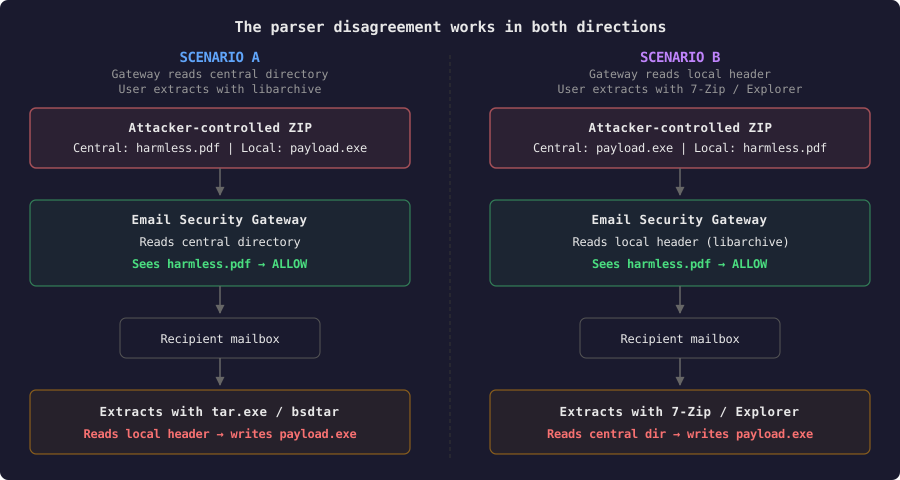
Scenario A: Gateway reads central directory, user extracts with libarchive
The attacker edits the central directory name to an allowed extension (e.g. .pdf), while the local header retains the original name (e.g. payload.exe). The gateway reads the central directory, sees a PDF, and lets the archive through. The recipient extracts with a libarchive-based tool (bsdtar, Windows tar.exe), which reads the local header and writes payload.exe to disk.
Scenario B: Gateway uses libarchive, user extracts with unzip/7-Zip/Explorer
The attacker edits the local header name to an allowed extension, while the central directory retains the original dangerous name. A gateway built on libarchive reads the local header, sees a PDF, and passes the archive. The recipient extracts with 7-Zip, Info-ZIP, or Windows Explorer, reads the central directory, and gets payload.exe.
Scenario B may be more realistic in practice. On Windows, the vast majority of users extract ZIPs with Explorer's built-in handler or 7-Zip. Both read the central directory. The probability that a recipient uses tar.exe (Scenario A) or any utility that uses libarchive is much lower than the probability they use 7-Zip or right-click → Extract All (Scenario B).
Yet, the scenarios can be applied not only on classic "victim runs malware on the machine" situations. There can be a scenario where the ZIP archive targets a workflow, a software pipeline where at some point libarchive is used to extract contents of a ZIP archive. Accordingly, email security gateways are not the only defense mechanism that parses or filters filenames. Mechanisms include also:
- Web proxies
- CI/CD pipelines
- Cloud storages
- WAFs
etc. An email security gateway is one of the scenarios and a direct way to test this assumption.
For either scenario to become an actual bypass, every link in the chain must hold:
- The attacker can supply or modify the archive bytes (e.g. as an email attachment)
- The gateway accepts archives with inconsistent local/central filenames without flagging them
- The gateway's allow/block decision depends on the exposed extension, not on decrypted content inspection
- The gateway and the recipient's extraction tool read different filename records
- The resulting filename difference violates an intended policy
The filename-derived type is not the actual file type. A security service that sees .pdf cannot verify it without the password. The weak assumption is treating the filename as an authoritative type indicator for encrypted content. Therefore, a password-protected ZIP would have bigger chances of succeeding, as the file contents cannot be inspected.
Part 2: Testing Against a Real Gateway
The primitive is established and the parser disagreement is reproducible. The question is whether a real security product falls for it.
I set up a lab with a commercial cloud-based Secure Email Gateway sitting in front of a simple mail server. The gateway inspects inbound email attachments and applies filename-based content policies. The configuration:
- Attachment filter: block
*.exeinside archives, with archive content scanning enabled - Password-protected archive handling: set to allow encrypted attachments through (not block them outright)
This is a realistic enterprise configuration. Many organizations permit password-protected ZIPs because users legitimately exchange them. The gateway inspects whatever metadata it can read and applies its filter rules to the filenames it finds.
Testing against real
Three archives were sent through a known email security gateway as attachments, each containing the same harmless test file:
| Test | Central directory | Local header | Encrypted? | Gateway decision |
|---|---|---|---|---|
| Baseline | payload.exe |
payload.exe |
No | Blocked |
| Control | report.pdf |
report.pdf |
No | Allowed |
| Central-only rename | report.pdf |
payload.exe |
No | Allowed |
The baseline was correctly blocked. The central-only rename passed through; the gateway read the central directory, saw report.pdf, found no match against its *.exe block rule, and delivered the message. The local header still said payload.exe. The file data was unchanged.
What This Confirms
The tested gateway reads exclusively from the central directory when evaluating attachment filenames inside ZIP archives. It does not check the local header and it does not detect or flag the inconsistency between the two records.
Detection
Comparing local and central directory filenames for every ZIP entry catches this immediately. The inconsistency is trivially detectable. The problem is that most products do not check for it.
Classification: CWE-436: Interpretation Conflict
References: